
Import a chart from Ultimate Guitar in two taps
You find the song on Ultimate Guitar. GraceNote keeps it on your device, with the right key, ready for rehearsal and for the stage, even with no internet.
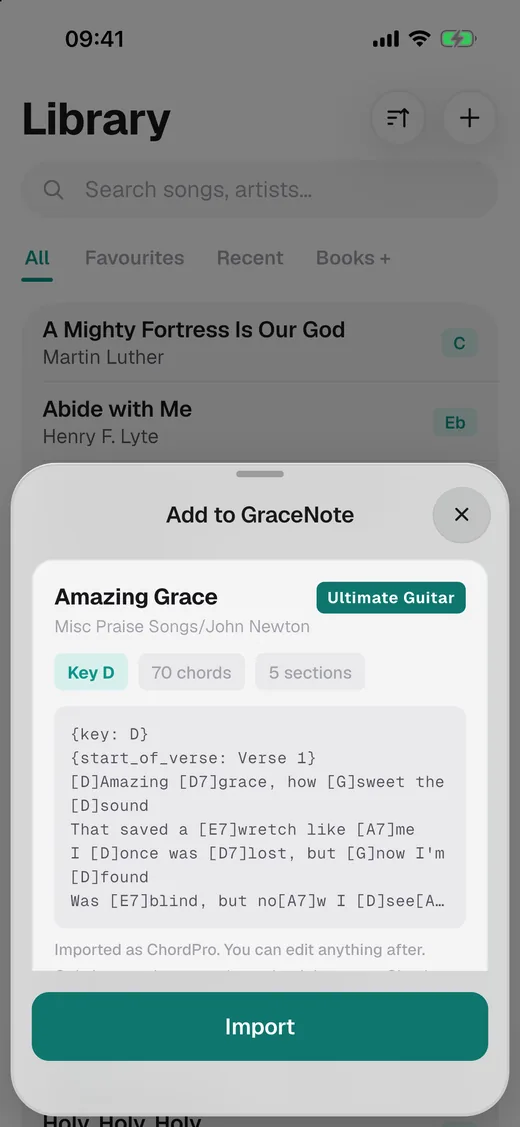
How to import
- Open the song on Ultimate Guitar, in Safari or Chrome.
- Tap Share and choose GraceNote.
- Check the preview and tap Import.
GraceNote reads the title, the artist, the key, the capo, the suggested tempo and the tuning when it isn't standard. It reads the sections (intro, verse, chorus) and puts each chord over the right syllable, as it was on the site. Chrome shares only the link, and GraceNote opens the page itself.
After you import
- Change the key in one tap. Set a capo and the app shows the shapes you play.
- Build the set and drag the songs into order.
- On stage: dark theme, big chords, autoscroll at your speed and a swipe to the next song.
- No internet needed: the song is on your device. No signal backstage? Nothing changes.
Other sites
GraceNote also imports from Worship Together, PNW Chords and more. The full list is on the chord sites page.
Questions
Do I need internet to play?
Only to import. After that the chart is on your device.
Is it free?
Yes, up to 50 songs and one set, with the rest of the app included. GraceNote Pro removes the limits. It's a yearly subscription, and the first month is free.
Can I import any chart?
Only import charts you have the right to use, and check each site's terms.